Turn your share plan spreadsheet into a dashboard everyone understands

Share Council works out the vesting on every grant, top-up and leaver, and generates each grant contract. Finance downloads the report in Excel as of any date.

Rockfeather's plan on Share Council grew from ten employees to over 30.

app.sharecouncil.co/wallet
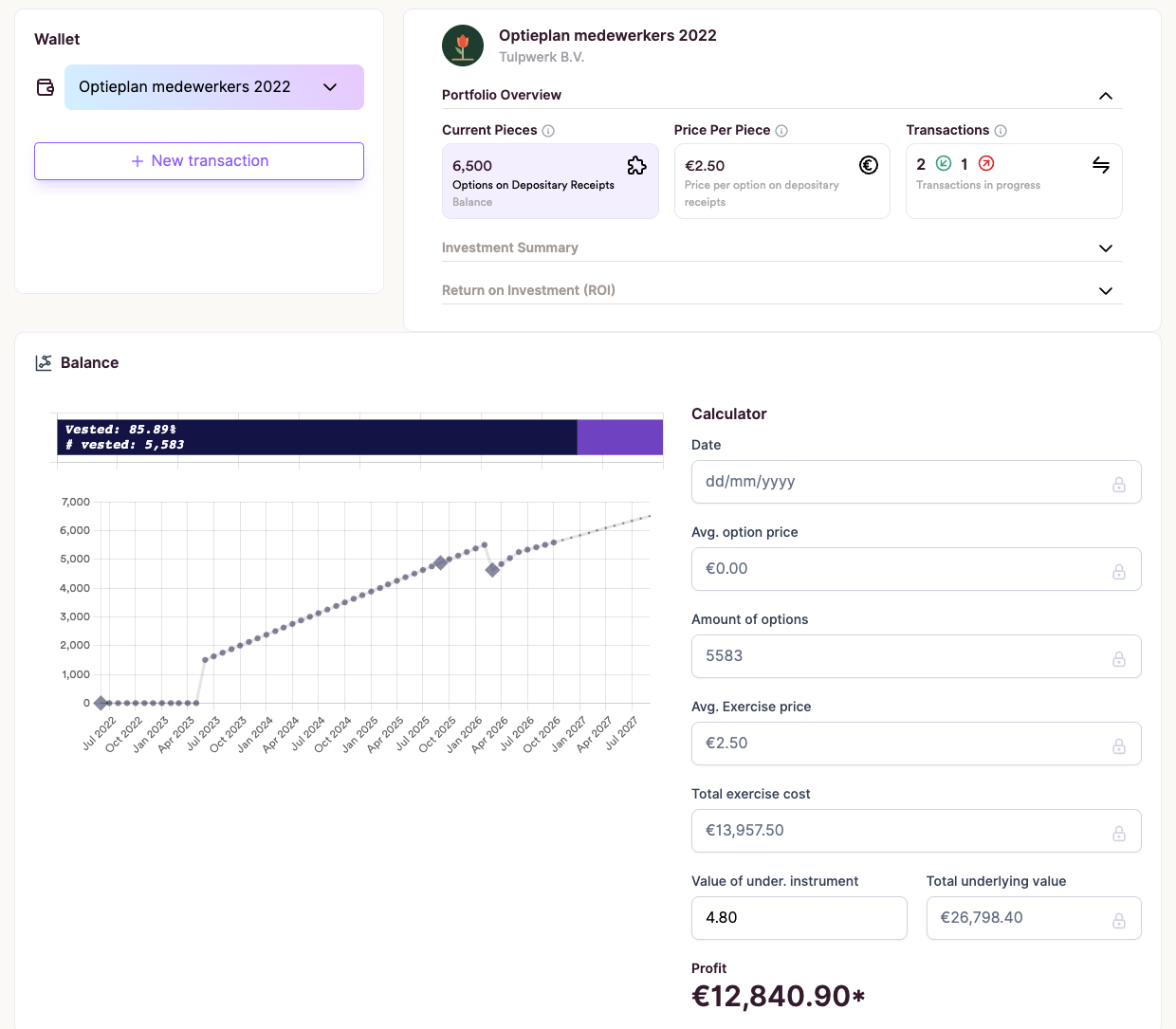
Lotte's option wallet at Tulpwerk: 6,500 options across her first grant and her top-up, 5,583 of them vested, and her vesting chart

Stop redoing the vesting maths every time something changes

Today

Every change means another version of your file

  • You work out vesting, top-ups and leavers by hand in Excel.
  • Contracts sit in a shared drive, in several versions.
  • At year end you rebuild the totals for finance.
With Share Council

You enter each change once, and the numbers follow

  • Share Council calculates each grant's vesting, top-ups and leavers included.
  • Each grant gets a generated contract, signed in the platform.
  • Finance downloads the report in Excel.

Get your grants out of Excel in five steps

We call it the Joiner-to-Leaver Routine.

  1. Bring your current grants in

    Our team brings your current grants in with you.

    YouShare Council team

  2. Invite your employees

    Invite your employees by email from the Members tab.

    YouEmployee

  3. Add joiners and top-ups as grants

    Each grant gets its own vesting and a generated contract that the employee signs online.

    YouEmployee

  4. Enter a leaver's date

    Vesting stops on that date, and the unvested part returns to the pool.

    You

  5. Send finance the year-end report

    Download the vesting report in Excel as of 31 December.

    Youas of any date

Enter each change once, and the numbers stay right

Tulpwerk is our demo company. The numbers are made up, the screens are real.

Give a joiner a login on day one

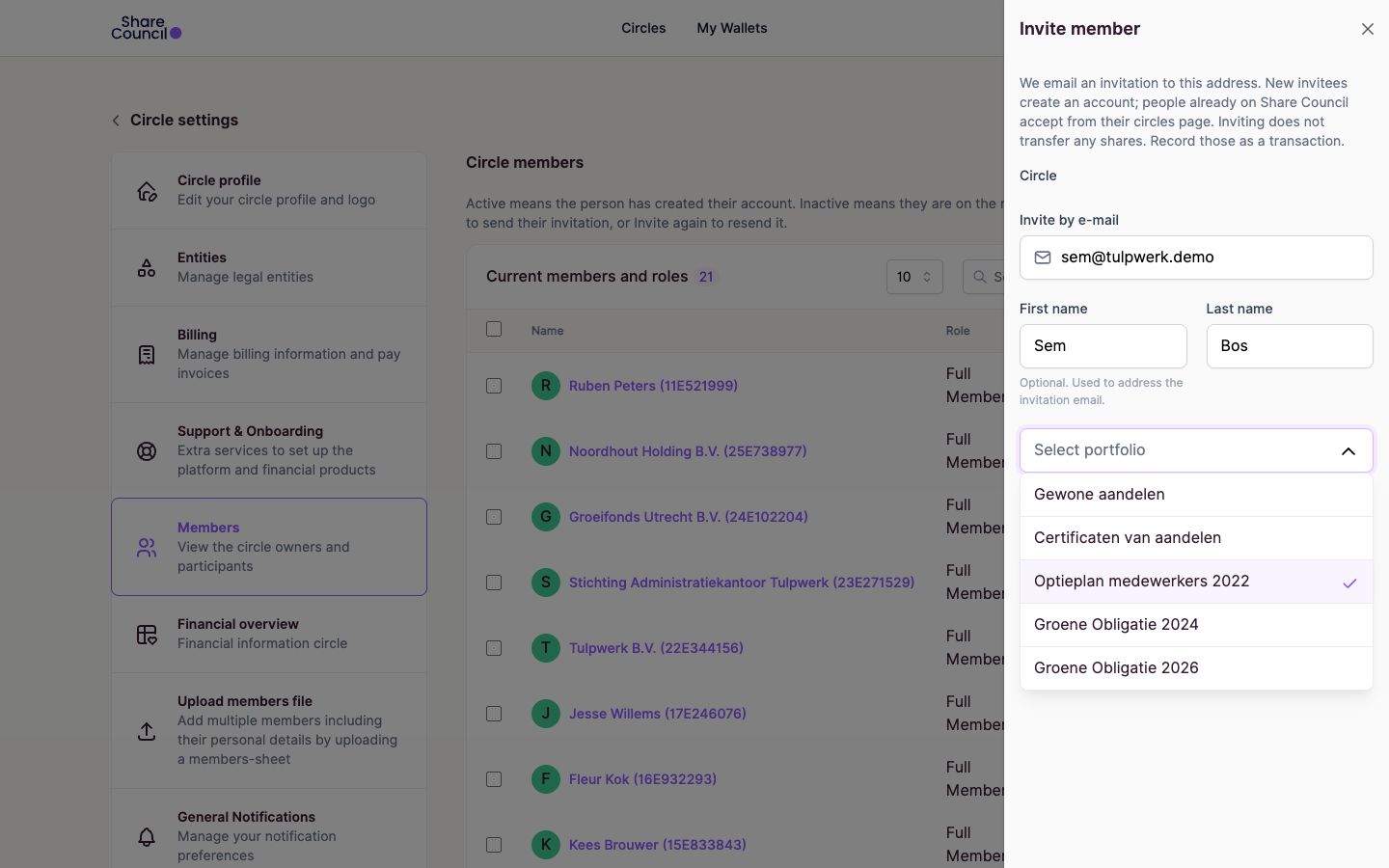
Inviting Sem Bos takes his email and the plans he should see. Inviting someone to your organisation shows it in a short demo.

app.sharecouncil.co/circle/members
Inviting Sem Bos to Tulpwerk by email, with the option plan ticked in the list of portfolios he will see
Inviting Sem Bos to the 2022 option plan.

Every grant and top-up comes with its contract drafted

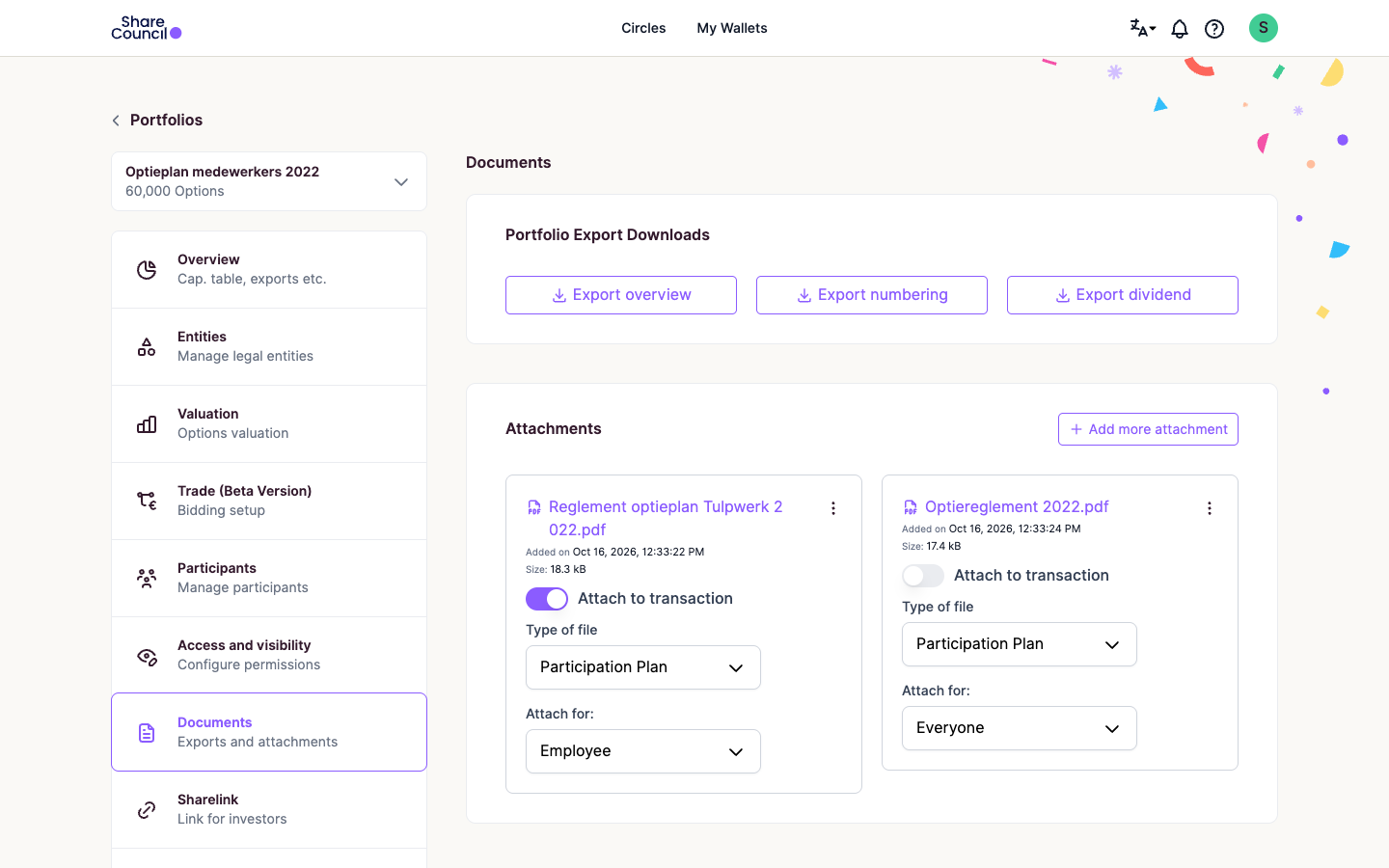
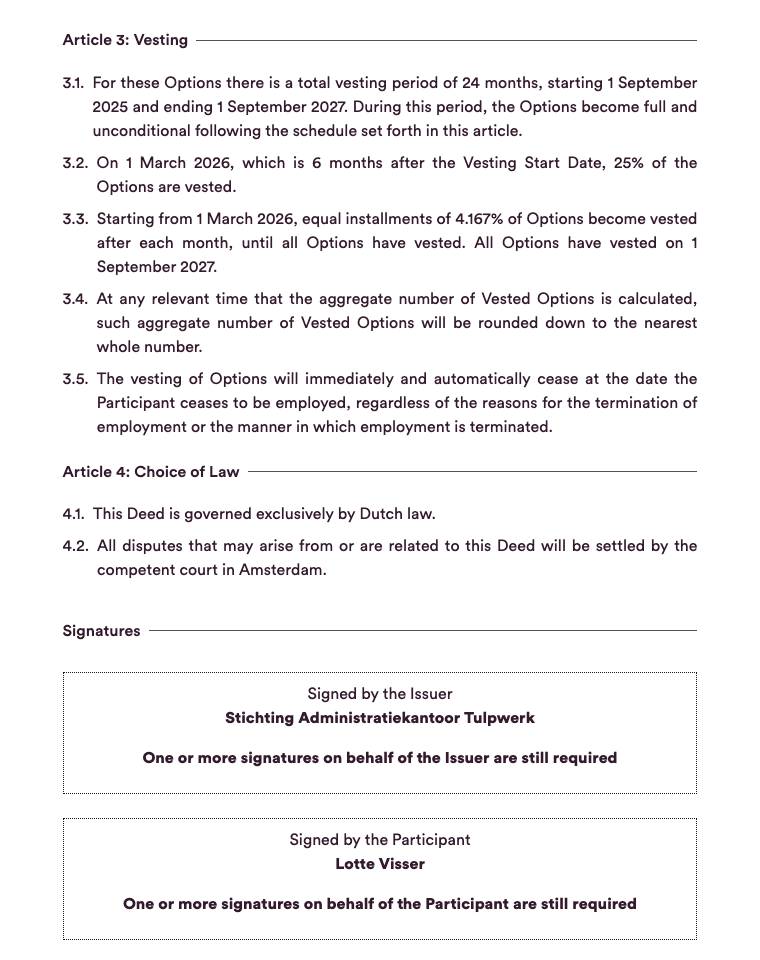
Upload the plan rules (the reglement) once, and Share Council attaches them to every grant with a contract generated from your template. Lotte's top-up of 1 September 2025 got its own contract and 24-month vesting.

app.sharecouncil.co/portfolio/documents
The Documents tab of Tulpwerk's 2022 option plan: the plan rules are uploaded and set to be attached to every transaction to an employee
The 2022 plan rules, attached to every grant.
Optieovereenkomst Lotte Visser.pdf
Lotte's generated contract for her top-up grant: 24 months of vesting from 1 September 2025, and signature boxes for the STAK and for Lotte that are still open
Lotte's generated top-up contract.

Close a leaver's grant by entering one date

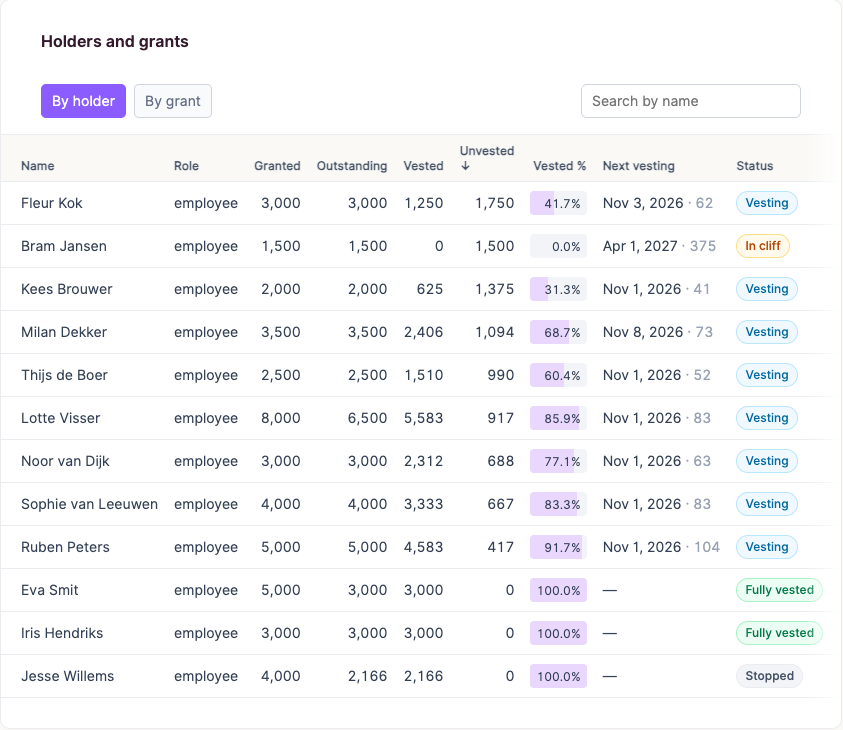
Jesse Willems left Tulpwerk on 31 August 2024, so HR stopped his vesting on that date. He kept 2,166 options and 1,834 went back to the pool. How to stop a participant's vesting walks through it.

app.sharecouncil.co/vesting-report
The holders table of the vesting report for Tulpwerk's 2022 option plan: Jesse Willems, who left, kept 2,166 of 4,000 options and shows as Stopped
Jesse Willems shows as Stopped.

Employees find their vesting without emailing you

Milan Dekker got 3,500 options on 8 January 2024, vesting over four years with a one-year cliff. In October 2026 his wallet shows 2,406 vested.

Hand finance the year-end numbers in one download

  • 60,000

    options in the pool

    Tulpwerk demo, 16 Oct 2026.

  • 39,166

    granted to 12 employees

    Tulpwerk demo, 16 Oct 2026.

  • 29,768

    vested

    Tulpwerk demo, 16 Oct 2026.

  • 9,398

    still unvested

    Tulpwerk demo, 16 Oct 2026.

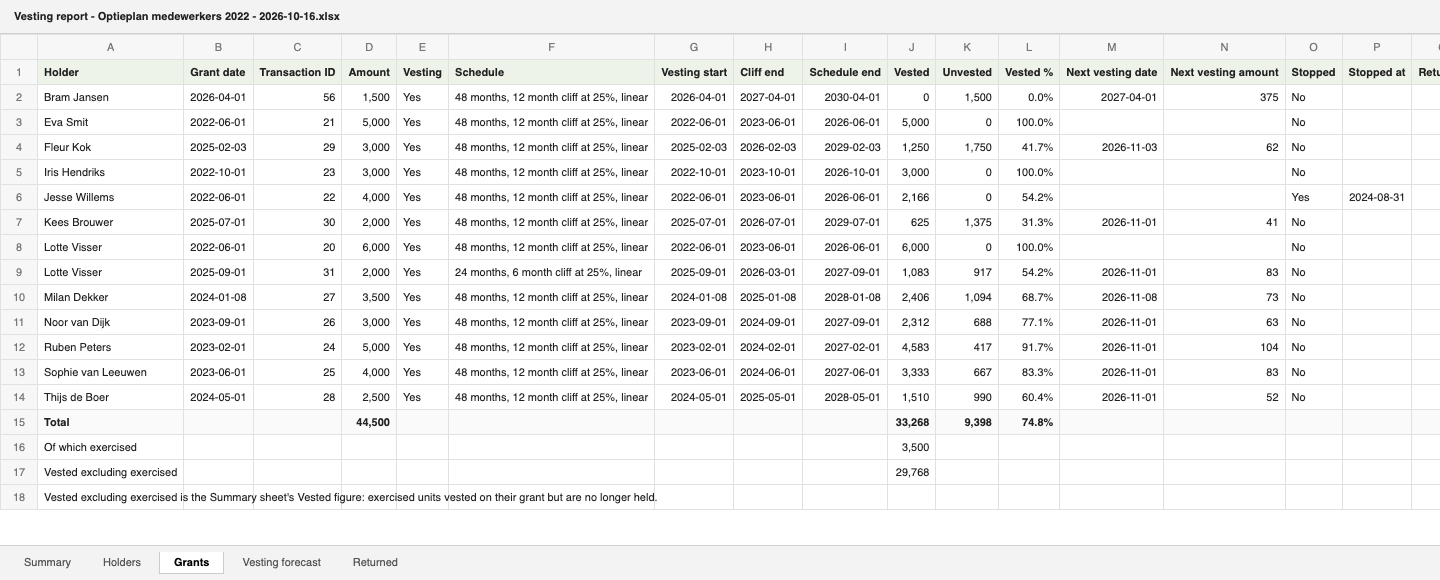
Vesting report - Optieplan medewerkers 2022 - 2026-10-16.xlsx
The Excel download: one row per grant on the Grants sheet, totals underneath, with Summary, Holders, Vesting forecast and Returned sheets alongside
A rendering of the Excel download.

Grow the plan with the company, as Rockfeather did

Rather than endless documents or unclear structures, employees could simply log in and see how things were set up.

RockfeatherFrom the Rockfeather customer story on the Share Council blog

The Inbox-Free Share Plan

What you getWhat it saves you
  • Your current grants, brought in with our team

    A paid service by the Share Council team.

    No retypingof your file

  • Vesting worked out for every grant, top-up and leaver

    A top-up vests on its own schedule.

    No formulasto keep up

  • Generated contracts with your plan rules attached

    In Dutch or English, signed online.

    1 versionof the rules

  • An invitation and a wallet for every employee

    Behind a two-factor login.

    No emailto look up vesting

  • Vesting report as of any date, in Excel

    By employee or by grant.

    1 downloadat year end

  • Expert hours, when a question comes up

    A Share Council specialist looks at your plan with you. Book an expert hour and pay only for the time you use.

    By the hourwhen you need it

  • Bonus: the Employee Explainer

    A page in Dutch and English on reading the wallet.

    1 pagewith every invitation

This runs on a paid plan. See what each plan includes on our pricing page.

Create an account

If an employee can't find their vesting, we walk you through it

If one of your first ten invited employees can't find their vested number, we give your team a free 30-minute walkthrough.

Try it before you pay

  • Create an account and invite people for free.
  • Pay for a plan monthly, and for expert hours only when you use them.

Know up front what stays with your adviser

Plan for these outside Share Council

  • TaxWe don't calculate or withhold tax. Your tax adviser confirms the treatment for your employees.
  • HR or payroll softwareThere is no link; reports download to Excel.
  • Automatic leaver termsYou stop vesting and apply your plan rules yourself.
  • The notary and qualified signaturesSetting up a STAK needs a civil-law notary. Signing in the platform is not a qualified electronic signature.

If you are unsure, book an expert hour.

Settle your doubts before you invite anyone

Can HR see everyone's holdings?

Only with the right role. A portfolio admin, the role usually given to HR, manages only the portfolios it is assigned to, such as the option plan, and cannot open company settings. Owners and administrators see the whole company, and a viewer sees who owns what, so check each role before you assign one.

Can you take over our existing Excel file?

Yes, as a paid service: our team brings your current grants in with you. After that, each joiner or top-up is a new grant and each leaver is a date.

Will employees understand what they see?

Each employee sees their vested number on a chart, in Dutch or English, and gets the Employee Explainer with the invitation.

Which plan do I need?

Shares and invitations are free. Options and certificates need a paid plan. Pricing shows what each plan includes.

Read up before your next joiner or leaver

Explain options to your employees

Options on certificates, for Dutch employees.

Read more

Give HR, finance and your accountant the right access

The six roles, and which one fits each person.

Read more

Other problems Share Council solves

Start an option plan in the Netherlands

Options on STAK certificates, with vesting.

Read more

Give key people a share in your SME

Certificates or SARs for key people.

Read more

Get your share plan out of Excel

Sending your first invitation is free.

Two-factor login is mandatory for everyone who uses the platform.